The easiest way to spell check a web page.
 Gregg Blanchard /
Every time I create a new landing page or even a blog post in some cases, I’ve always struggled to find a simple way to spell check my work which is a big deal given how many typos I end up with these days.
Then the other day I was talking shop with a coworker about designMode when he said:
“What a second…it’s not just making things editable, it’s highlighting errors.”
Sure enough. When I turned it on for Hemlock after making a quick change to the subheader this morning, there was a red squiggly line.
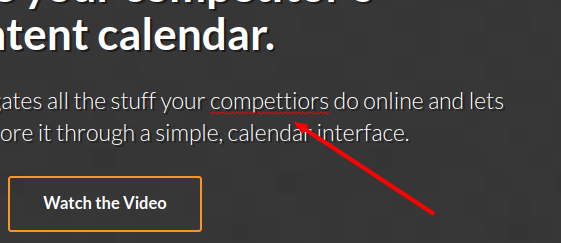
In Chrome, all you have to do is paste the follow code into the browser console:
document.designMode = “on”;
Or, based on that same friend’s suggestion, add this code to the URL field of a new bookmark to make it even easier to turn on:
javascript:document.designMode=’on’; void 0
No more Google-ing “web page spell checker” or pasting the entire text into Google doc. Design mode was already cool, this only made it moreso.